Veeam recently announced the new 12.3 release for the Veeam Data Platform which includes updates for both Backup & Replication and Veeam ONE. This is another point release for V12 however much like the previous releases, it feels more like a major release since it’s packed full of new features.
There’s far too many new additions to list out but here are a few:
- Microsoft Entra ID support
- Microsoft Windows Server 2025 support
- Cyber Resiliency enhancements – more on this below
- VMware Cloud Director support for malware detection and self-service disaster recovery
For a full list of new features and enhancements in this release see the links below.
VBR: https://www.veeam.com/veeam_backup_12_3_whats_new_wn.pdf
VONE: https://www.veeam.com/veeam_one_v12_3_whats_new_wn.pdf
Upgrade Process
Everything you need to plan and perform the upgrade can be found in the KB articles:
VBR: https://www.veeam.com/kb4696
VONE: https://www.veeam.com/kb4705
As always, to ensure the best possible upgrade experience, it is recommended to read through the Release Notes first before initiating the upgrade.
VBR: https://helpcenter.veeam.com/rn/veeam_backup_12_3_release_notes.html
VONE: https://helpcenter.veeam.com/rn/veeam_one_12_3_release_notes.html
I won’t be covering the upgrade process in this post but a full step by step guide is available here:
VBR: https://helpcenter.veeam.com/docs/backup/vsphere/upgrade_vbr.html?ver=120
VONE: https://helpcenter.veeam.com/docs/one/deployment/upgrade.html?ver=120
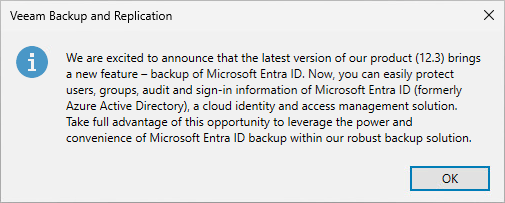
Once upgraded to 12.3 you will get a popup relating to Entra ID support when opening the Backup & Replication console for the first time.
New Cyber Resiliency enhancements
As I mentioned earlier, there are too many new features to discuss in a single blog post but if I had to pick one that peaked my interest, it would be the Cyber Resiliency enhancements. Since the introduction of cyber resiliency features into Backup & Replication in 12.1, Veeam have continued to develop and improve in this area, first with 12.2 and now again in 12.3.
We all know cyber attacks prove to be a constant threat and unfortunately are at the front of one’s mind more often than not. The ability to use backup workstreams and data as an opportunity to scan and identify potential threats has proven to be extremely effective in the fight against malware and the new enhancements in 12.3 will only help aid in this further.
Indicators of Compromise (IoC) Detection
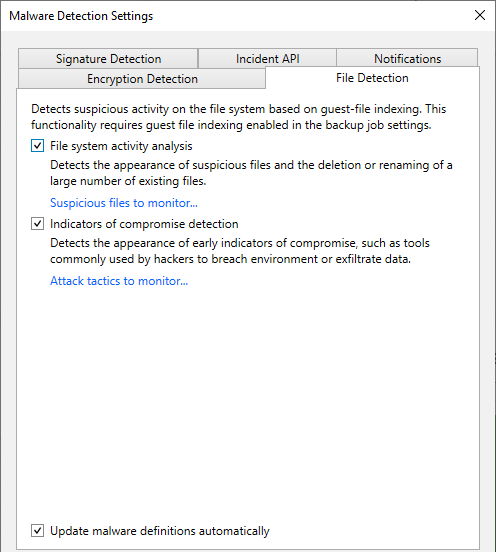
Veeam previously introduced file system activity analysis which uses guest indexing data to detect the appearance of suspicious files and the renaming/deleting of large numbers of files. Any restore points that are flagged as infected in this type of scenario likely involves data being encrypted – but not always. This is where IoC Detection comes into play.
Leveraging the same guest indexing data, Veeam uses an up to date list of malware definitions to detect and report on the appearance of common tools used by cybercriminals to breach environments. Identifying these types of threats early enough could make all the difference in preventing your data being compromised.
The IoC detections are based off the MITRE ATT&CK Matrix – a globally-accessible knowledge base of adversary tactics and techniques. The actual list of the different tools Veeam is monitoring for is extensive! You can look through the whole list yourself by going to Malware Detection Settings > File Detection tab then clicking on the Attach tactics to monitor link. This is also the area where tools can be excluded from monitoring.

To test this feature out I copied a WinSCP executable, one of the entries in the list onto a VM. Running a backup job with guest indexing configured resulted in a malware detection event being triggered.

Opening the associated log file displayed in the event shows the detail of the file that triggered the event.

Veeam Threat Hunter
When it comes to performing scheduled and on-demand scanning restore points, there have been two options up until now.
Antivirus scanning – the “traditional” offering which has been in the product for a number of years. Brings the flexibility of BYO AV or simply using the built in Windows Defender. However the scan checks against a huge list of malware signatures often resulting in a significant speed and performance impact.
YARA scanning – much faster than antivirus scanning however designed to search for a very specific list of signatures.
The Veeam Threat Hunter is designed to bring the best parts of antivirus and YARA scanning together, creating a faster and more comprehensive user experience. Based on a new signature based malware detection engine, Veeam Threat Hunter brings several other advantages over its predecessors:
- Built directly into the product requiring none of the third party AV prerequisites
- Uses machine learning and heuristic analysis to identify even the most advanced threats
- Malware signatures updated hourly to detect even the most recent threats
So what does this mean in a real world scenario? Well, Veeam are confident that the Threat Hunter scan time can be up to 6 times faster in some instances when compared to Windows Defender which is a massive improvement!

Obviously YMMV depending on the type, size and number of files being scanned. I ran a quick test to compare the two by scanning a single restore point of a small VM with single OS disk (~200k files).

As you can see from the results below, there is a significant improvement when using the Veeam Threat Hunter. Even with a relatively small number of files being scanned, it was still 2x quicker when compared to Windows Defender.


UI Changes
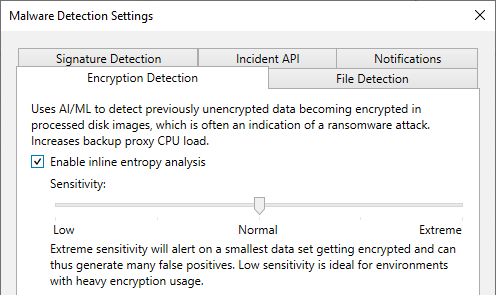
These recent changes have resulted in some slight tweaks to the Malware Detection Settings UI where the “General” tab has been split out into 3 new tabs.

Encryption Detection – Inline entropy analysis scanning blocks in the data stream
File Detection – File system activity analysis using guest indexing data including the ability to detect indicators of compromise
Signature Detection – Select between Veeam Threat Hunter and BYO AV detection engines. It’s worth noting here that Veeam Threat Hunter is only selected by default on new VBR installations. If you upgrade to 12.3 from an older version, BYO AV will still be selected.

When turning on Threat Hunter Veeam recommend the Threat Hunter folder is excluded from any AV running on the mount servers as per KB1999.
Wrapping Up
I’m looking forward to reaping the benefits of these new cyber resiliency features and it seems a no-brainer to put them to use as soon as possible.
Having not even scratched the surface of what’s on offer in 12.3, I’m planning to cover some of the other new features in more detail in future posts. That includes Veeam ONE which is another topic entirely. Stay tuned for more updates in this space soon!
 benharmer.blog
Leave a comment