
Veeam recently held their bi-annual VeeamOn event which this year was called the Resiliency Summit. The event was heavily security focused and includes new features coming to the Veeam Data Platform. It looks like Veeam have changed from the naming convention for “minor” product releases with this version being 12.1 rather than the expected 12a. Don’t let this minor release fool you into thinking this is a small update though. The new feature set should help combat some of the cyber security threats we are faced with day to day as well as further tightening security best practices by building upon some of the features that were added in V12.
Although V12.1 isn’t due to be released until the end of the year (which isn’t too far away!) I wanted to touch on some of the exciting new features. Since the release is still under development, I will only be covering topics at a high level as the content may be subject to change.
Offline Malware Detection
Veeam has supported signature based antivirus scanning since V9.5 for both SureBackup jobs and also during the restore process using Secure Restore. I like to think of this process as “offline detection” as it happens after the backup job has completed by scanning the contents within the backup images.
The new release builds upon this existing technology in several ways.
Firstly, SureBackup jobs no longer requires a virtual lab to run a content scan. This eliminates the need to have a vSphere or Hyper-V environment setup if your only requirement is to scan the backup content.
The second enhancement allows content scans to be performed on-demand outside of a SureBackup or restore job. This option gives you more flexibility on what restore points should be scanned with the ability to also define a time range to narrow your search.

Inline Malware Detection
Up until this point, detecting malware presence with Veeam has only been possible after the backup process is complete as discussed above. As effective as this is, having the certainty of “clean” data does have a few drawbacks. Without taking into consideration real time monitoring tools for a moment such as anti-virus software, the malware scanning process is reactive. The only way to safely determine whether your backups contain infected data is to scan them. The Secure Restore process involves mounting the disks from the backup images and scanning the contents in its entirety. This takes time and can have an impact on how often a SureBackup job is scheduled to run. The same is true when restoring data, especially when it is known to contain malware. Without knowing exactly when the infection occurred, working through multiple restore points to find one without infection can be very time consuming.
To address these issues, Veeam has announced some new features which have the ability to identify malware on the fly.
Encryption detection checks to see if any data is being encrypted, indicating a ransomware attack. It does this by reading each incoming data block at the time of backup and then comparing it against known threats using AI and machine learning. Performing this inline is a much more proactive approach to malware detection and should dramatically reduce the time constraints when compared with Secure Restore. No additional pre-requisites are needed for this to work other than some additional CPU load on the backup proxy.
Suspicious activity detection can be used to look for files that may have already been encrypted. It does this by running a file index scan which is compared against both a malware definitions database to detect any known strains and also against previous restore points to detect anomalies for a large numbers of files with suspicious extensions. Guest file system indexing must be enabled in the backup job for this setting to take effect.

I have a feeling that this could be a game changer for malware detection going forward and I look forward to trying it out on release!
To tie this all together, any suspicious activity is flagged within the job and the resulting restore points show up in the new Malware Detection section of the console as either infecting or suspicious.

Four-Eyes Authorization
This feature is one that I mentioned in a previous blog just a few months ago and it’s great to see it will be making it into the next release! The main purpose is to prevent accidental deletion of backups due to human error by requesting approval from a second backup admin when attempting to delete backups or repositories. Enabling this will be a no-brainer as it’s sure to save your bacon at some point in the future.

Security & Compliance Analyzer
The Security & Compliance Analyzer builds upon the foundations of the Best Practices Analyzer which was introduced in the release of V12. Over 20 additional checks have been added to V12.1 to further secure the data within your backup environment. In addition, the upcoming release now has the ability to run the analyzer on a daily schedule and email the results. Having the analyzer report on a regular basis will highlight any potential risks much sooner and also help with any new potential security flaws going forward.
Veeam Threat Center
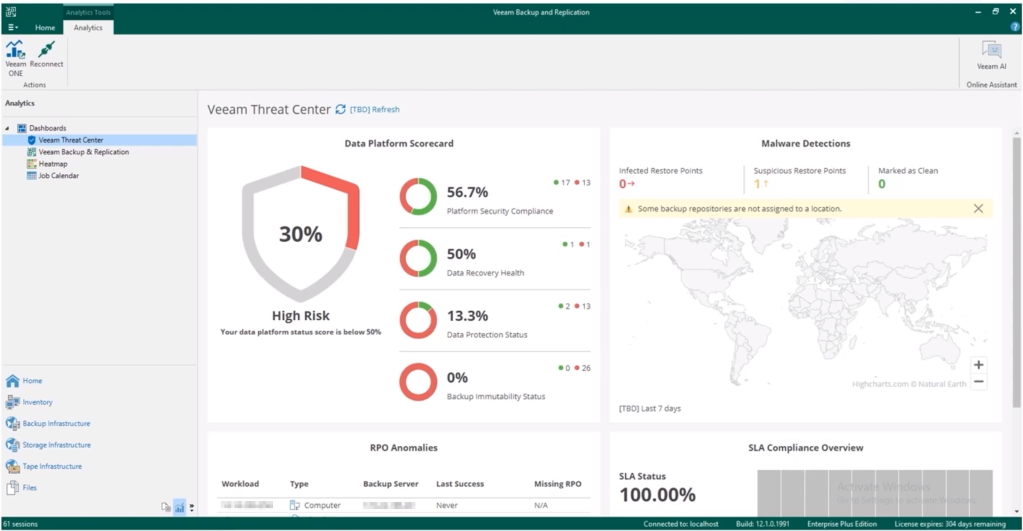
In the V12.1 Backup & Replication console there is a new Analytics node which contains the new Threat Center dashboard. This integrates from Veeam One straight into Backup & Replication to give a nice single pane of glass view of your backup environment status including scorecards, malware map, anomalies and compliance.
There are of course many more new features included in the upcoming release outside of what I mentioned. Checkout the VeeamOn Resiliency Summit for more content about the release.
 benharmer.blog
Leave a comment