Since Veeam Backup & Replication V12 was released a few months ago, I’ve had time to get some hands on real world experience with the product and thought I’d share my top 3 favourite new features.
Direct to Object Storage
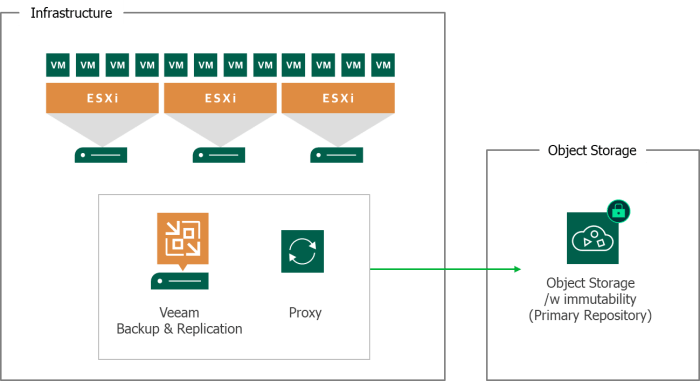
I think this one is likely to be at the top of most peoples list. Object Storage continues to become more widely used year on year by organisations whether it be public cloud based or on prem. In the past few software releases Veeam has been pushing many of its new features at object storage and this trend continues in V12.
Prior to V12 backing up to object storage was possible but only after it landed on disk first, via the capacity tier of a Scale out Backup Repository. The ability to store backup jobs directly on object storage will be a gamer changer for many with a number of benefits:
- Increased scalability, reliability and resiliency offered by S3 storage vendors
- Potential for reduced cost and complexity – no requirement to purchase hardware for disk based repositories to store/stage backups
- No requirement to use Scale out Backup Repository – direct to object supported on backup regular repository
New backup chain metadata format
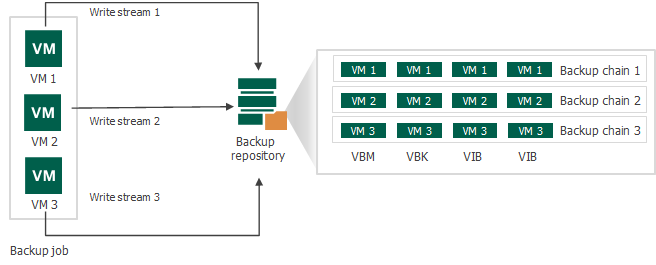
This is a feature that the community have been requesting for quite a while but it’s understandable that it took some time to be released. Since the very early days of Veeam, all the metadata for a backup job has been stored in a single .vbm file. This metadata is a fundamental part of the inner workings of Backup & Replication and is critical when it comes to backup and restore operations, and I would imagine changing the way it is architected is no easy feat.
In V12 backup chains now have a metadata file per machine. So why is this so important? Well, although it doesn’t sound like much, storing the metadata in separate .vbm files opens up a truckload of possibilities:
- Move machines between backup jobs
- Perform retry and active full operations on individual machines within a job – no more re-running the entire backup job containing multiple machines just because a single machine failed to backup!
- Run a health check on a different schedule to the backup job
VeeaMover
Since Veeam supports a wide variety of storage types for backup repository use, the introduction of the aptly named VeeaMover is a timely one. At its core, the VeeaMover give us the ability to move backups between different repository types. While Veeam has been able to do this in part, it involves manual processes and a limited repository scope. The VeeaMover aims to change this by allowing data in the source repository to be migrated to the target no matter its repository type. Some of the VeeaMover use cases include:
- Rebalancing Scale out Backup Repositories
- Migrating from NTFS to ReFS
- Migrating from ReFS to XFS
- Migrating to object storage
I really like this agnostic approach as it really simplifies the process of moving data around giving us the freedom and flexibility to choose where our data resides.
Block Clone Awareness
Ok so this is a feature in itself which would technically make it my top 4, but I can’t help but give it an honourable mention since it ties in so well with the VeeaMover.
When moving data between repositories that have block clone awareness such as ReFS or XFS, it will preserve the space savings. That means no more rehydration of data and losing out on the incredible space savings you’ve built up over time!
Closing Thoughts
V12 in my opinion is one of the biggest and best Veeam releases in years and it’s great to see it packed full of so many ground breaking features. With so many to choose from, it was difficult to narrow it down to just 3. I also like that many of the features compliment each other nicely. For example, the VeeaMover is used to move machines between backup jobs and migrate data to s3 backup repositories enabling direct backups to object storage.
There are many more great features outside of what was covered here and I would highly recommend checking out the full list in What’s New guide.
 benharmer.blog
Leave a comment