I was upgrading an internal Veeam instance from V11 to V12 today and came across the error Failed to upgrade host components. Error: Access is denied.’ when upgrading the components.
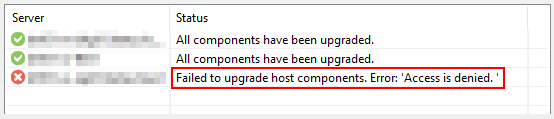
After digging through the logs a bit I found mention of ‘Access is denied’ in Utils.HostsUpgrade.log:
[10.05.2023 16:18:22.074] <17> Info         [xxx] Preparing VeeamDeploymentDll for upgrade
[10.05.2023 16:18:22.078] <18> Info         [RPC] RPC confirm session has been created. Id: {f1cf56ef-1789-471b-820a-83873d87911b}
[10.05.2023 16:18:22.086] <18> Info         [RPC] Destroying RPC confirm session. Id: {f1cf56ef-1789-471b-820a-83873d87911b}
[10.05.2023 16:18:22.088] <17> Info         [CProxyRpcInvoker] RpcInvoker [42253292] was disposed
[10.05.2023 16:18:22.089] <17> Info         [xxx] Upgrading Installer's DLL on server.
[10.05.2023 16:18:22.092] <18> Info         [RPC] Upgrading deployment service dll...
[10.05.2023 16:18:22.092] <18> Info         [RPC]   Getting upload folder path for host 'xxx'.
[10.05.2023 16:18:22.093] <18> Info         [RPC]   Upload folder path: 'C:\Windows\Veeam\Backup\Upload'
[10.05.2023 16:18:22.093] <18> Info         [RPC]   Uploading file 'C:\Program Files\Veeam\Backup and Replication\Backup\Packages\VeeamDeploymentDll.dll' to host 'xxx'. Destination path: 'C:\Windows\Veeam\Backup\Upload\VeeamDeploymentDll.dll'.
[10.05.2023 16:18:22.101] <18> Info         [RPC]   Uploading file 'C:\Program Files\Veeam\Backup and Replication\Backup\Packages\VeeamDeploymentDll.dll' to host 'xxx'. Destination path: 'C:\Windows\Veeam\Backup\Upload\VeeamDeploymentDll.dll'. Failed.
[10.05.2023 16:18:22.101] <18> Info         [RPC] Upgrading deployment service dll... Failed.
[10.05.2023 16:18:22.101] <18> Error        [RPC] Access is denied.
[10.05.2023 16:18:22.101] <18> Error        [RPC] --tr:Error code: 0x00000005
[10.05.2023 16:18:22.101] <18> Error        [RPC] --tr:FC: Failed to create file. File path: [C:\Windows\Veeam\Backup\Upload\VeeamDeploymentDll.dll]. Desired access: [1073741824]. Creation disposition: [0].
[10.05.2023 16:18:22.101] <18> Error        [RPC] --tr:Failed to upload file 'C:\Program Files\Veeam\Backup and Replication\Backup\Packages\VeeamDeploymentDll.dll' to host 'xxx'. Destination path: 'C:\Windows\Veeam\Backup\Upload\VeeamDeploymentDll.dll'
[10.05.2023 16:18:22.102] <17> Error        Native method execution failed: upgrade service dll - Access is denied.
[10.05.2023 16:18:22.102] <17> Error        --tr:Error code: 0x00000005
When a server’s Veeam components are upgraded, the new files are staged on the server in the directory C:\Windows\Veeam\Backup\Upload. The log shows an attempt to upload VeeamDeploymentDll.dll into that directory. I could see that the server had a file named VeeamDeploymentDll.dll in the upload directory already which was from the last V11 upgrade.

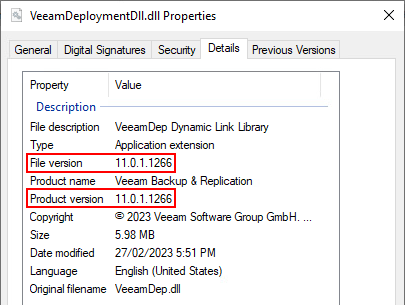
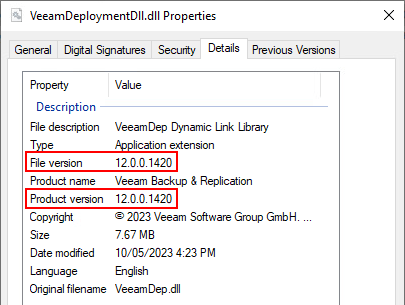
Since the log mentions failing to create the file in the path, I figured it could be a permissions issue where Veeam was unable to overwrite the file. Renaming the dll file (deleting/moving it should work too) and re-running the upgrade of the component resulted in a new V12 VeeamDeploymentDll.dll being created and the upgrade completed successfully.

 benharmer.blog
Leave a comment