If you make use of the Self-Service Portal in Veeam Enterprise Manager you will probably know that storage quotas are enforced for each vCD organization added into the Self-Service section. I think quotas are a good idea as they help manage and control the storage consumption in the backend, which is even more crucial at scale. With that in mind, it is important to know when storage consumption is close to the quota limit so that action can be taken to either increase the quota or remove any data no longer required. If the quota limit is reached it will result in backup jobs failing which is something I’m sure everyone wants to avoid.

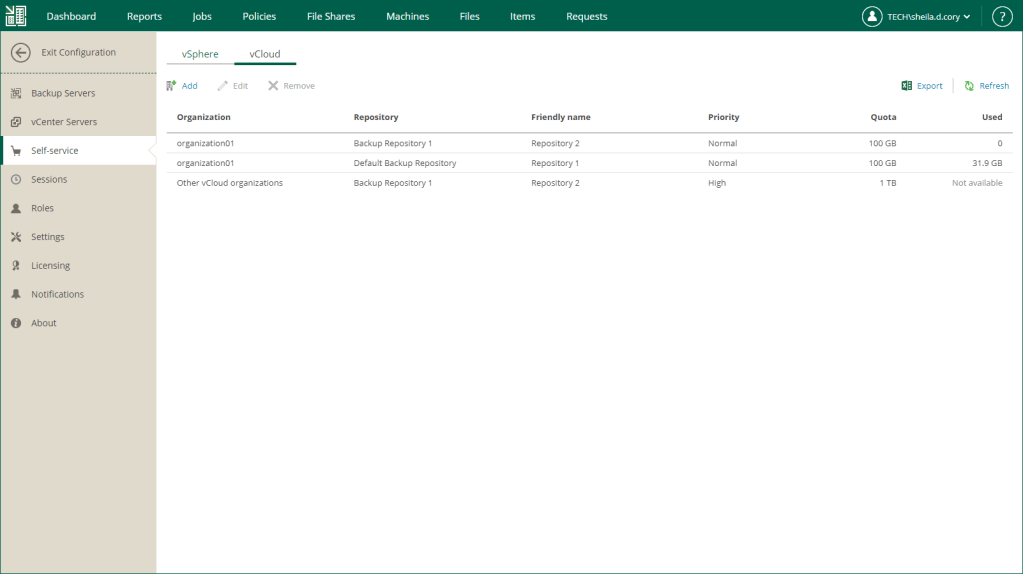
Out of the box, the easiest way to get the current storage consumption values via the Enterprise Manager web interface. Although this does the job, there is a better way to achieve the same outcome which is far more efficient.
Luckily Enterprise Manager has a great API we can leverage to automate this process. Using PowerShell I have created a script which will gather all orgs, assigned quotas, and consumed space in both TB and percent formats then send the results as an email.
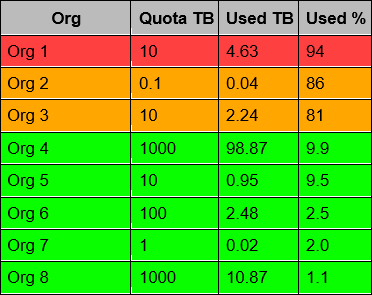
As you can see the output is in a format that makes it easy to digest. The table is ordered by the Used % column and uses severity indicators to quickly show any organizations that are getting close to their quota limit.
Below is the full PowerShell script:
The script contains 3 functions and a few variables need to be configured to suit your environment. These are highlighted in the script code at the bottom of the post and summarised in the table below.
| Function | Variable | Required | Notes |
|---|---|---|---|
| Authenticate-EM | $entMgrUrl | Yes | Enter the Veeam Enterprise Manager server name and port in format FQDN:Port. The default port will be 9398 unless you have changed it. |
| Authenticate-EM | $entMgrCreds = Import-CliXml -Path “Path to xml credentials file” | Yes | By default, the script is designed to run unattended via a scheduled task. For this to work we need a way to provide the script credentials without the need for user interaction. Export-CliXml is a great way to achieve this. Credentials are stored in a file in an encrypted format. The article below has a good write up on how to store credentials using Export-CliXml. https://www.jaapbrasser.com/quickly-and-securely-storing-your-credentials-powershell/ |
| Email-Results | $From | Yes | Your sender address |
| Email-Results | $To | Yes | Your receiver address |
| Email-Results | $SMTPServer | Yes | Your SMTP server that will send the e-mails |
| Email-Results | $Port | No | Port 25 is used by default however you can change this if your SMTP server uses a different port. |
| Email-Results | $warning | No | Default value is 80. This relates to a percentage and corresponds to the value returned in the Used % column. When an organization’s storage consumption is equal to or above this value, the corresponding row will be coloured orange depicting a warning alert. |
| Email-Results | $critical | No | Default value is 90. This relates to a percentage and corresponds to the value returned in the Used % column. When an organization’s storage consumption is equal to or above this value, the corresponding row will be coloured red depicting a critical alert. |
Note that $auth = Authenticate-EM -prompt $false can be changed to $auth = Authenticate-EM -prompt $true when running the script interactively. This will prompt for credentials which should have administrative privileges to the Enterprise Manager server.
function Authenticate-EM
{
    [cmdletbinding()]
    param(
        [Parameter(Mandatory, ValueFromPipeline)]
        [boolean]$prompt
    )
    begin
    {
        $entMgrUrl = "https://FQDN:Port" #enterprise manager server url
        if ($prompt -eq $false)
        {
            $entMgrCreds = Import-CliXml -Path "Path to xml credentials file" #get credentials and connect to veeam em via api
        elseif ($prompt -eq $true)
        {
            $entMgrCreds = Get-Credential -Message "Enter credentials with admin privileges to Enterprise Manager server"
        }
        [hashtable]$headers = @{}
    }
    process
    {
        $veeamAuth = Invoke-WebRequest -Uri "$entMgrUrl/api/sessionMngr/?v=latest" -Method POST -Credential ($entMgrCreds) -ErrorAction Stop
        $sessionId = $veeamAuth.Headers["X-RestSvcSessionId"]
        $headers.entMgrUrl = $entMgrUrl
        $headers.sessionId = $sessionId
    }
    end
    {
        return $headers
    }
}

function Get-Quota
{
	param(
		[Parameter(Mandatory, ValueFromPipeline)]
        [hashtable]$headers
	)

    begin
    {
        #results array
        $quotaArray = @()
    }

    process
    {
        #get organization configs
        $uriOrgConfigs = "$($headers.entMgrUrl)/api/vCloud/orgConfigs"
        $responseOrgConfigs = Invoke-WebRequest -Uri $uriOrgConfigs -Method GET -Headers @{"X-RestSvcSessionId" = $headers.sessionId} -ErrorAction Stop
        $orgConfigs = ([xml]$responseOrgConfigs.Content).EntityReferences.Ref | Where-Object {$_.Name -ne "Other organizations"}

        foreach ($orgConfigsLoop in $orgConfigs)
        {
            $uriOrgConfigs2 = $orgConfigsLoop.href+"?format=Entity"
            $responseOrgConfigs2 = Invoke-WebRequest -Uri $uriOrgConfigs2 -Method GET -Headers @{"X-RestSvcSessionId" = $headers.sessionId} -ErrorAction Stop
            $orgUid = ([xml]$responseOrgConfigs2.Content).VCloudOrganizationConfig.UID.Replace("urn:veeam:VCloudOrganizationConfig:", '')
            $orgName = ([xml]$responseOrgConfigs2.Content).VCloudOrganizationConfig.name
            #quota is stored in tb - calculate in tb
            $quota = [math]::round(([xml]$responseOrgConfigs2.Content).VCloudOrganizationConfig.QuotaGb/1024, 2)
            #usedquota is stored in mb - calculate in tb
            $usedQuota = [math]::round(([xml]$responseOrgConfigs2.Content).VCloudOrganizationConfig.UsedQuotaMb/1024/1024, 2)

            #save results into array
            $quotaArray += [pscustomobject] @{
            'org' = $orgName
            'quotaTB' = $quota
            'usedQuotaTB' = $usedQuota
            'usedQuotaPercent' = [math]::Round(($usedQuota / $quota) * 100, 1)
            }
        }
    }
    end
    {
        return $quotaArray | Sort usedQuotaPercent -Descending
    }
}

function Email-Results
{
	param(
		[Parameter(Mandatory, ValueFromPipeline)]
        [array]$results
	)

    begin
    {
        #email
        $From = "sender address"
        $To = "receiver address"
        $Subject = "Backup Quotas"
        $SMTPServer = "SMTP server"
        $Port = 25

        #severity
        $warning = 80
        $critical = 90
    }
    process
    {
        $Body += "
        <style>
            body {font-family: Arial; font-size: 10pt;}
            table {border: 1px solid black; border-collapse: collapse;}
            th {border: 1px solid black; padding: 5px;}
            th.header {background: #bbbbbb;}
            td {border: 1px solid black; padding: 5px;}
            td.normal {background: #09ff00;}
            td.warning {background: #ffa700;}
            td.critical {background: #ff4040;}
        </style>
        <table>
            <tr>
                <th class='header'>Org</th>
                <th class='header'>Quota TB</th>
                <th class='header'>Used TB</th>
                <th class='header'>Used %</th>
            </tr>"

        foreach ($result in $results)
        {
            if ($result.usedQuotaPercent -lt $warning)
            {
                $tdClass = "normal"
            }
            elseif ($result.usedQuotaPercent -ge $warning -and $result.usedQuotaPercent -lt $critical)
            {
                $tdClass = "warning"
            }
            elseif ($result.usedQuotaPercent -ge $critical)
            {
                $tdClass = "critical"
            }
            $Body += "
            <tr>
                <td class='$($tdClass)'>$($result.org)</td>
                <td class='$($tdClass)'>$($result.quotaTB)</td>
                <td class='$($tdClass)'>$($result.usedQuotaTB)</td>
                <td class='$($tdClass)'>$($result.usedQuotaPercent)</td>
            </tr>"
        }
    }
    end
    {
        $Body += "
        </table>"
        Send-MailMessage -From $From -to $To -Subject $Subject -BodyAsHtml $Body -SmtpServer $SMTPServer -Port $Port
    }
}

$auth = Authenticate-EM -prompt $false #authenticate with API to get token
$quota = Get-Quota -headers $auth #return all org values
$email = Email-Results -results $quota #send email with quota values in tabular format
 benharmer.blog
Leave a comment